 Notch
Notch Shots going left
Why are my shots going left?
Your shots consistently land left of centre. Here is what Notch suggests you check.

Free to download.
iPhone and Apple Watch.
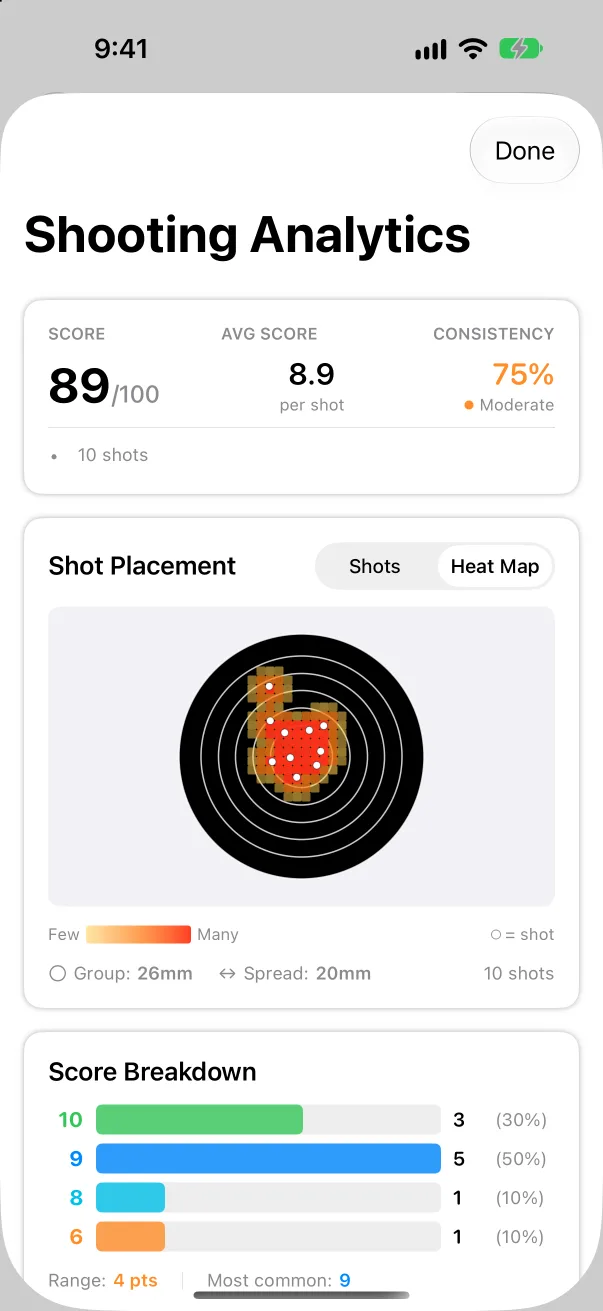
See it in your own groups
One card can mislead. Notch scores each card from a photo and builds a picture across sessions, so you can tell a habit from a bad day.
Or is it the sight?
If the group is tight and the offset repeats across a whole card, the sight may need moving. Work out the clicks.
Correct Left Pull
- Check your stance: ensure feet are shoulder-width apart
- Verify grip pressure is even between both hands
- Focus on straight-back trigger pull
- Consider adjusting sight alignment
These are the suggestions Notch shows in the app. Follow your range's safety rules and your coach's advice.
Other group patterns
Shots going rightYour shots consistently land right of centre.
Shooting highYour shots are consistently high.
Shooting lowYour shots are consistently low.
Vertical stringingVertical stringing suggests breathing issues.
Horizontal spreadHorizontal dispersion points to trigger control.
StringingYour shots form a line pattern.
Questions
Why are my shots going left?
Your shots consistently land left of centre. Start with: Check your stance: ensure feet are shoulder-width apart.
What Notch does
Target scoringScore a card from a photo.
Shot analysisGroup size, heat maps and ring breakdown.
Sight calculatorHow many clicks move the group to centre.
CoachingFind the fundamental to work on next.
SessionsTrack range days, rifles and trends.
ExportShare cards and reports with your club.
Printable targetsPractice faces at true size, ready to print.
Photograph the target. Notch scores the card.
Notch is on the App Store, for iPhone and Apple Watch.