 Notch


 App of the Day
from the creators of
 murmur
 Layered
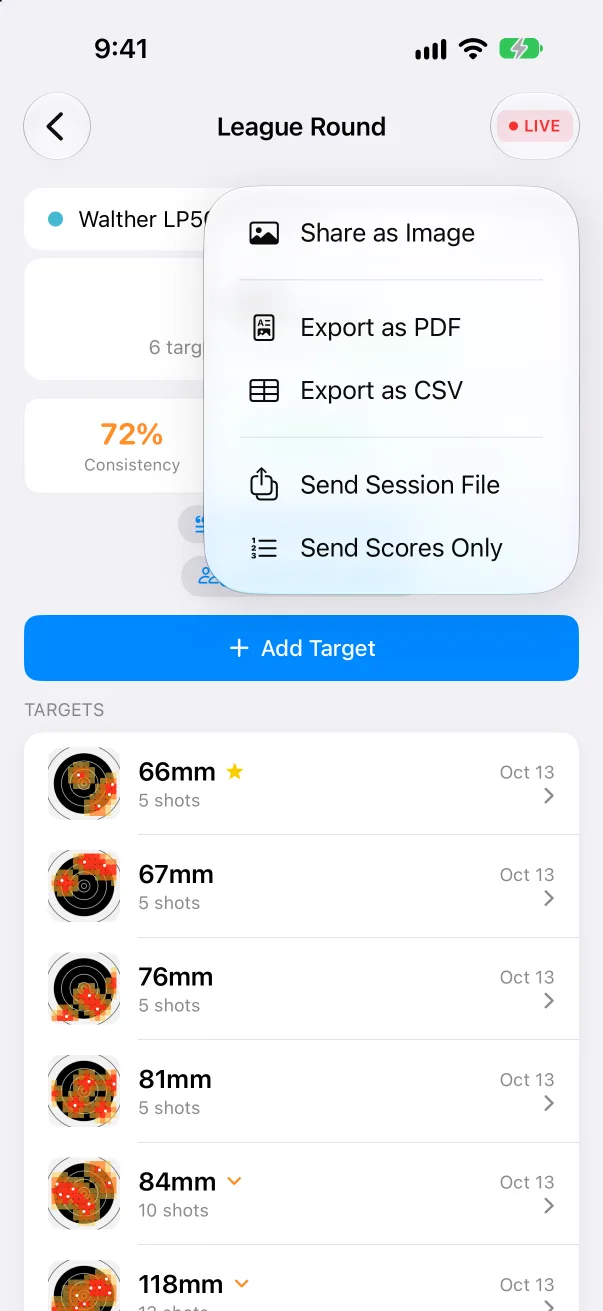
When members score their own cards, the secretary's job is to collect the files. Notch's share button offers four things, and each suits a different job.
What members can send
| What | What it holds | Good for |
|---|---|---|
| Image | one picture of the session | the club chat |
| the date, range and rifle, a summary, and each card with its photo and shots | a paper record | |
| CSV | the session totals, a line for each shot with its score, and a line for each card with its total, shot count and average | a spreadsheet |
| Session file | every shot's position, order and score, with or without the photos | another copy of Notch, such as the coach's |
Before the round
- Agree what a session is called. Ask for the competition and the round in the title, such as "Winter league, round 3". A session file carries the title in its name.
- Agree the card. Everyone picks the same card type, so the scores compare. The CSV names the type beside each card.
- One round, one session. A session's total covers every card in it.
The PDF and the CSV are named by date and carry no shooter's name. Ask for them in a message that does.
A message to copy
Scores for round 3, please. In Notch, open the session, tap the share button, choose Export as CSV and send it to me with your name. The coach would like the session file too: same menu, Send Session File.
When the files arrive
- Count the cards. "Total Targets" at the top of the CSV should match what the round calls for.
- Check the card type. The last block lists each card with its type.
- Take the total. "Total Score" is the session. Each card's own total is in the last block.
Whose count it is
A file from a member's phone is that member's count of their own card. A club decides what it accepts for its own shoots. In a league, the conditions say who scores: the NSRA says shooters in its winter postal competitions use local or central scorers depending on those conditions.
This guide describes Notch 1.9.2, the version on the App Store on 12 November 2026.
- NSRA: Winter Postal Competition
Updated 12 November 2026.
Questions
Which export should a club ask members for?
A CSV for a spreadsheet, a PDF for a paper record and a session file for the coach.
Does the CSV include the shooter's name?
No. It carries the date, the range, the rifle and the scores, so ask members to send it with their name.
Can members send scores without photos?
Yes. Send Scores Only makes a session file without the photographs.