 Notch


 App of the Day
from the creators of
 murmur
 Layered
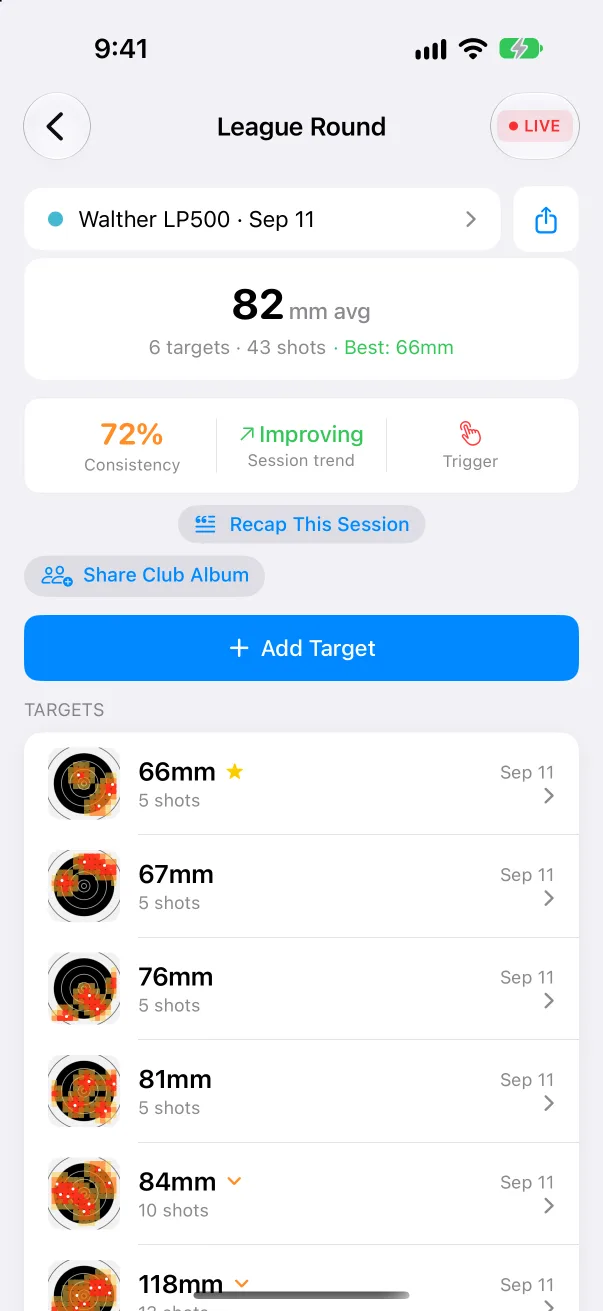
Scoring a stack of cards by hand means counting holes, adding up and gauging the close ones. Notch does the counting and the adding from a photo. The close shots stay with the scorer. This routine is written for Notch 1.9.2 on an iPhone.
1. Decide what a session holds
A session in Notch is a list of scored cards with one total. There are two ways to use it for a club shoot.
- One session for each shooter. Title it with the shooter's name and the round. The session total is that shooter's total.
- One session for the whole round. Every card sits in one list, in the order you photographed it. This is quicker to run, and the session total then adds every shooter together, so read the card totals.
Notch has no field for the shooter's name. Use the session title, or rely on the name written on the card.
2. Set the card type once
Set the target type in the session's details before the first card. New cards are scored against it, and a single card can be changed afterwards. On iOS 26 or later Notch also reads the printed header of the card and offers the matching type when it differs from the one you picked.
3. Photograph each card
Photograph the whole card, flat and in even light. Notch finds each shot, marks it on the photo and scores it. The photo is kept with the card, so anything written on it is kept too.
4. Check the close ones
Each mark shows what Notch counted. Where a shot sits near a line, compare the mark with the hole. You can move a mark, remove one or add a shot that was missed.
A shot too close to call still needs a gauge. How a paper target is scored covers the two kinds and how each is read.
5. Show the room
On iOS 27, connect the iPhone to the range TV. The session appears as a scoreboard with the total, the shots, the cards, the average and the last card, and the phone carries on scoring. The scoreboard follows one session, so it suits a session for each shooter.
6. Send the scores
The share button on a session offers a PDF, a CSV and a session file.
- PDF: the date, the range and the rifle, a summary, then each card with its photo and its shots.
- CSV: the session totals, a line for each shot with its score, and a line for each card with its total, shot count and average.
- Session file: every shot's position, order and score. It opens in another copy of Notch.
The PDF and the CSV do not carry the session title. Send them with the shooter's name or the round in the message.
Who can score what
How a club scores its own shoots is the club's decision. A league sets its own conditions. The NSRA says shooters in its winter postal competitions use local or central scorers depending on those conditions, and that its club leagues are open to club or local scoring, with central scorers checking quality through the season. It also trains club scorers in three classes, from C to A.
If your league has a view on scoring from photos, ask before the first round.
- NSRA: Winter Postal Competition
- NSRA: Scorers
Updated 12 November 2026.
Questions
Can one phone score every member's card?
Yes. Any card can be photographed and scored on the scorer's iPhone. A name written on the card stays in the photo.
What if the app misreads a shot?
Every shot is marked on the photo. The scorer can move a mark, remove one or add a shot that was missed.
Can a club use it for league cards?
A club can score its own shoots with it. In a league, the conditions say who scores. The NSRA describes its winter club leagues as open to club or local scoring, with central scorers checking quality through the season.