 Notch


 App of the Day
from the creators of
 murmur
 Layered
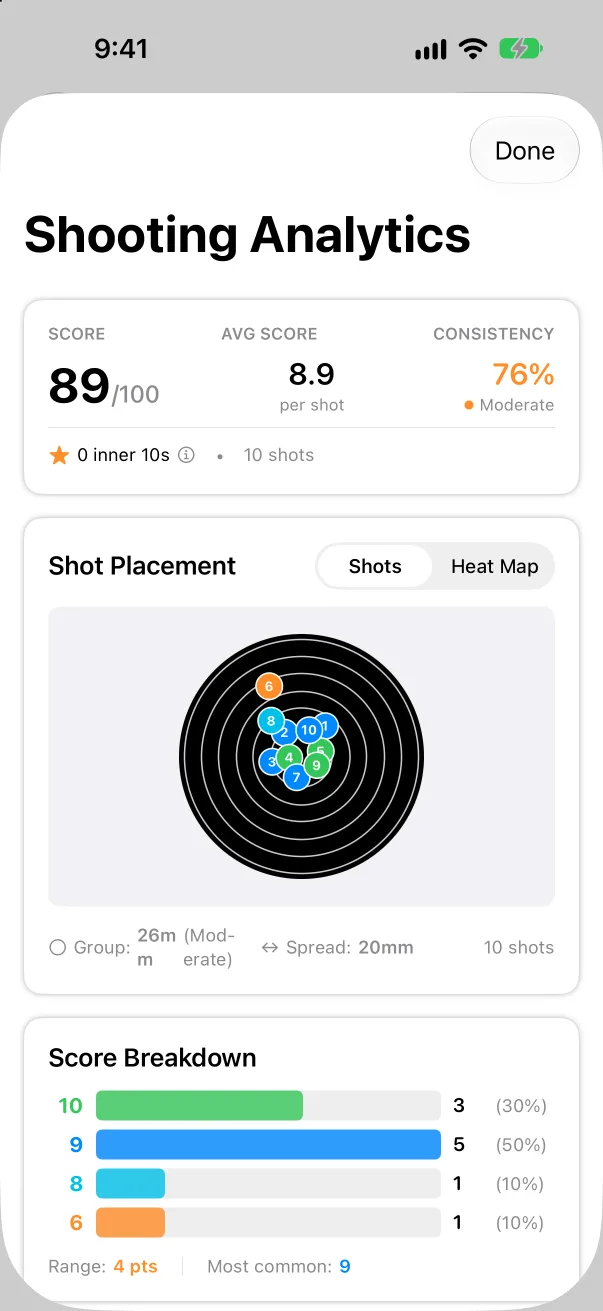
A coach cannot stand behind every shooter for every card. A session file lets a shooter send the card itself, as Notch scored it, to a coach who was somewhere else.
What is in the file
- The session's title, date, range, rifle and notes.
- For each card: its type, its total and the time it was scored.
- For each shot: where it landed, its score and its place in the order.
- What Notch read from the card: the rings it found and the pattern it flagged.
- The photo of each card, unless the shooter chose Send Scores Only.
The file is plain text. It can be read in a text editor as well as opened in Notch.
How it reaches you
The shooter opens the session, taps the share button and picks Send Session File, or Send Scores Only for a file without the photos. It travels as an attachment, by Mail or AirDrop, or as a file in Files.
Tap it on an iPhone with Notch and it opens as a session of your own, drawn the way the shooter saw it. If the file came from a newer version of Notch than yours, the app asks you to update first.
Three things to check
Where the group sits. A tight group away from centre points at the sights. A loose group around centre points at technique. When to move the sight has the test for telling them apart, and the sight calculator turns an offset into clicks.
When the group opened. Each shot keeps its place in the order. Scores that fall in the second half of a session point to fatigue, and the order shows which shots opened the group.
Which pattern Notch flagged. Notch names the pattern it sees, such as a pull to one side or vertical stringing, and says what to try. The site lists ten group patterns with what to check for each.
With photos or without
A file with photos lets you see the card, which helps with a shot on the line. Photos also make the file large. Scores only is small enough to email and still carries every shot's position.
What stays on the range
The file shows where the shots went. Position, hold and trigger work still have to be watched on the firing point, so treat a flagged pattern as the first thing to look at next session.
This guide describes Notch 1.9.2, the version on the App Store on 12 November 2026.
Updated 12 November 2026.
Questions
How do I open a .notchsession file?
Tap it in Mail or Files on an iPhone with Notch installed. It opens as a session with every shot, the rings and the score.
Does the coach need the photos?
No. Send Scores Only leaves the photos out and keeps each shot's position, order and score.
Can a session file be read without Notch?
It is plain text, so a text editor shows the shots and scores as numbers. Notch draws them on the card.